
Omarchy bar widget
Blip
iMessage in the Omarchy bar.
Read, send, groups, blue dots. Your Mac is the gateway, Linux is the client. An Omarchy bar widget under the MIT license.
Install
You need a Mac. That is the whole trick.
Blip does not reimplement iMessage. Apple's protocol only runs on Apple hardware, so Blip uses a Mac you already own as the gateway: any Mac signed into your Apple ID, awake and reachable over SSH. The Linux side is a thin client. No Mac, no Blip. When the Mac sleeps, Blip dims and waits.
Two commands, copied from the project README. The first installs the plugin and adds the bar widget. The second runs the setup wizard for the bridge to your Mac.
omarchy plugin add https://github.com/nixfred/blip.git --enable --yes
~/.config/omarchy/plugins/nixfred.blip/scripts/blip-setup you@your-macRequirements
- A Mac on macOS 13 Ventura or newer, signed into Messages with your Apple ID, reachable from the Linux box over SSH with key auth. Tailscale is recommended.
- Messages in iCloud turned on, so the Mac mirrors your phone.
- Xcode Command Line Tools on the Mac (xcode-select --install).
- Linux: Omarchy (Hyprland plus the Omarchy shell), with bun, jq, openssh, libnotify, wl-clipboard and xdg-utils. The wizard checks for each and prints the pacman line for what is missing.
Optional: ffmpeg and mpv for voice messages. zenity for the Save vCard folder picker.
The wizard pauses for two permission grants on the Mac: Full Disk Access for /usr/libexec/sshd-keygen-wrapper, and Automation for Messages on the first send. The Mac needs a screen, or Screen Sharing, once. Budget ten minutes.
Run the install from a terminal inside your Omarchy session. Nothing sends a message until you press Enter in a conversation.
After setup, the Mac must stay in a logged-in desktop session with Messages able to run, and it must not sleep. A sleeping Mac is an unreachable gateway: the widget dims and says so.
What it looks like
-
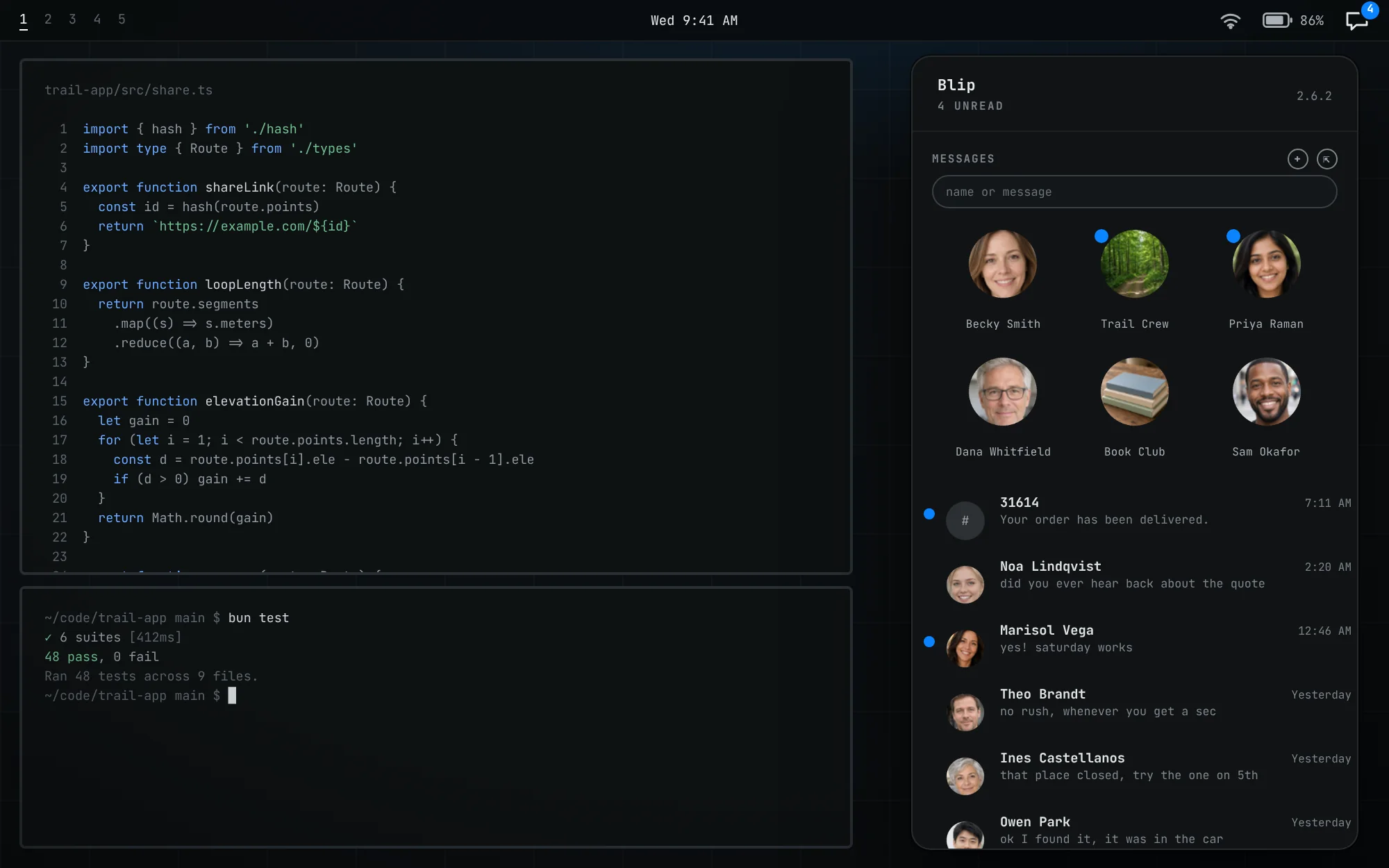
The bar popout. Pinned conversations as tiles, then your threads, with blue dots on the unread ones. The bar icon shows the count. -
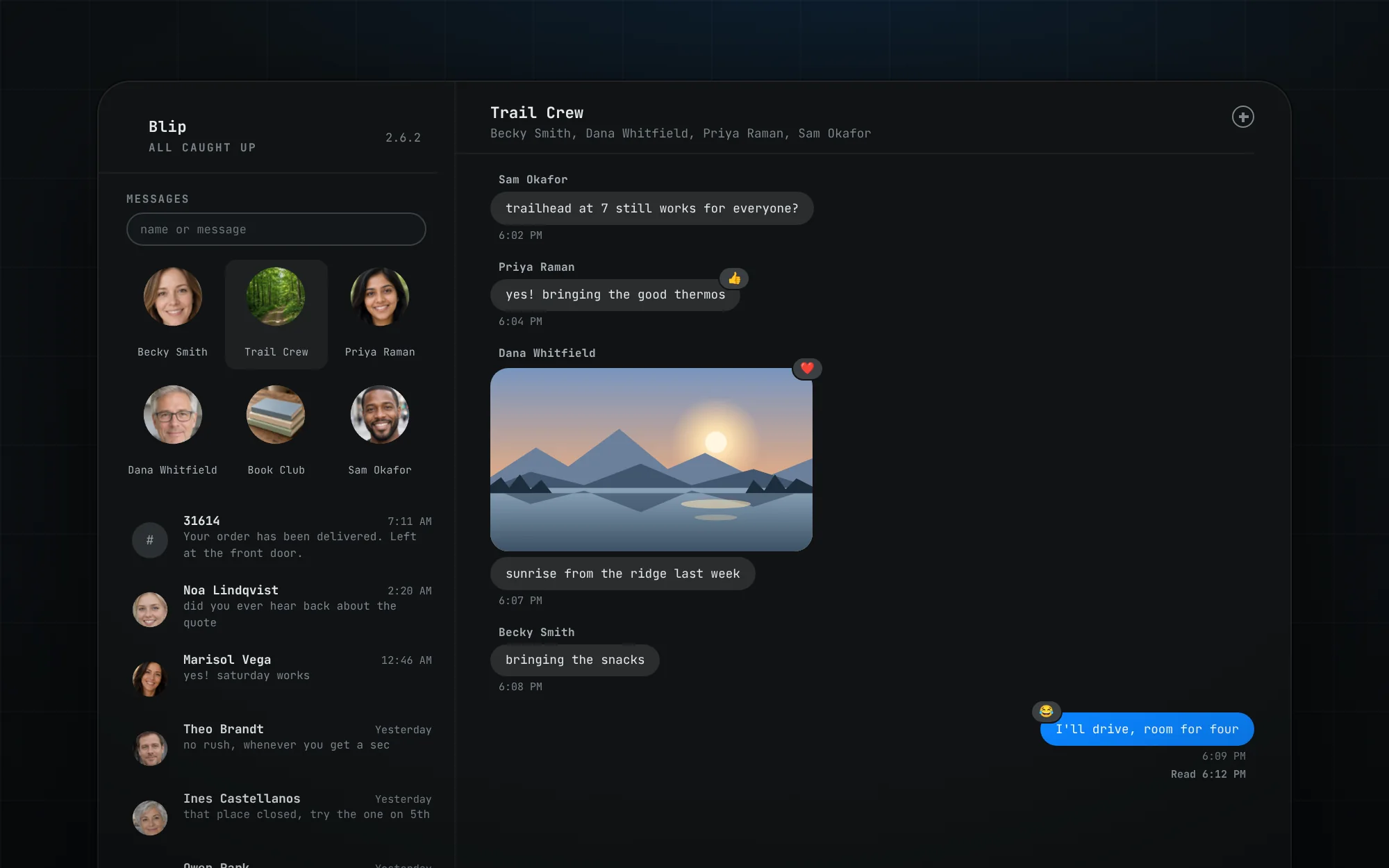
Groups, photos and tapbacks. A group thread with an inline photo, tapbacks, your reply in blue and the Read receipt underneath. -
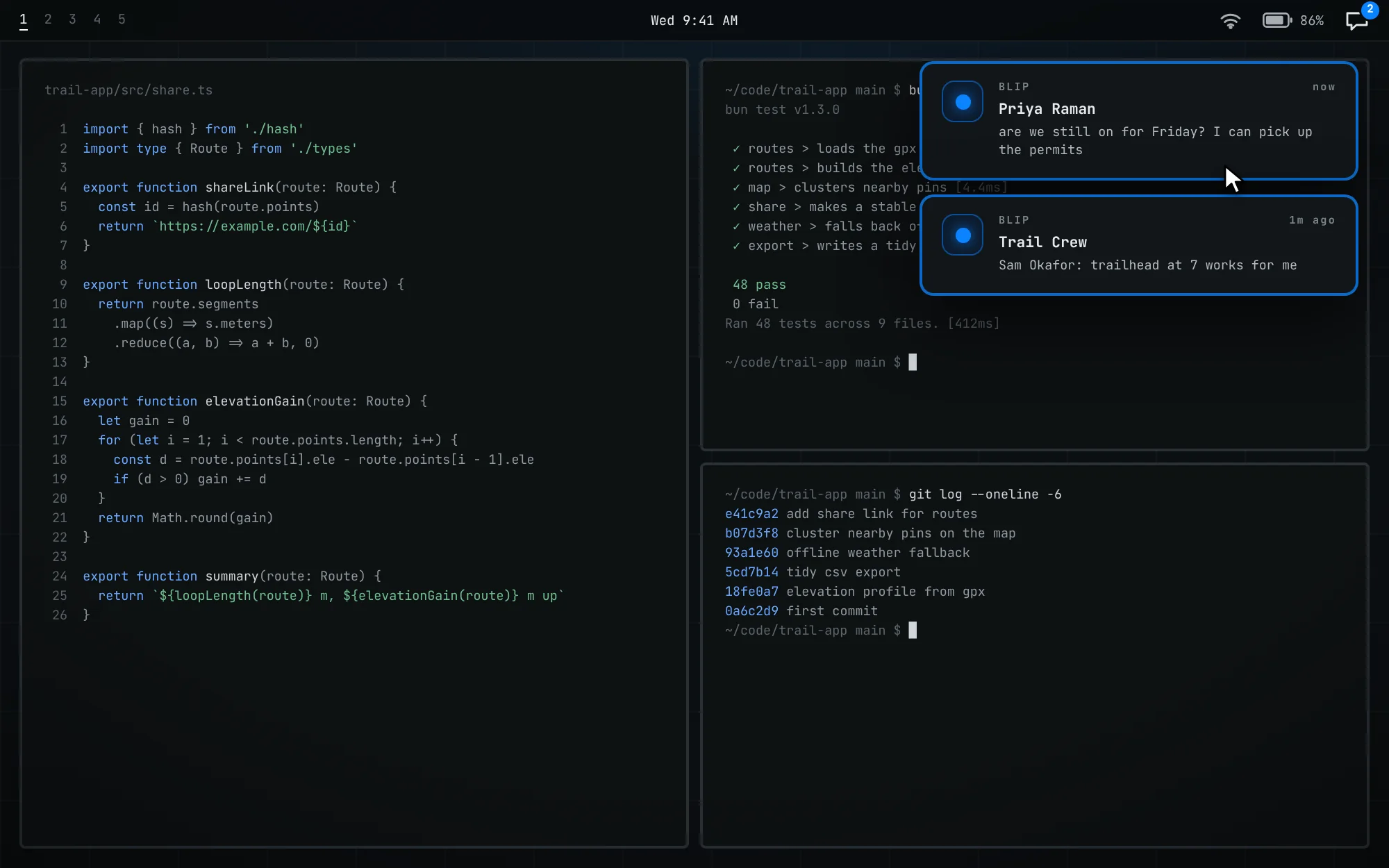
Toasts from the people you choose. A toast fires only for senders on your allowlist. Click one and the panel opens on that conversation. -
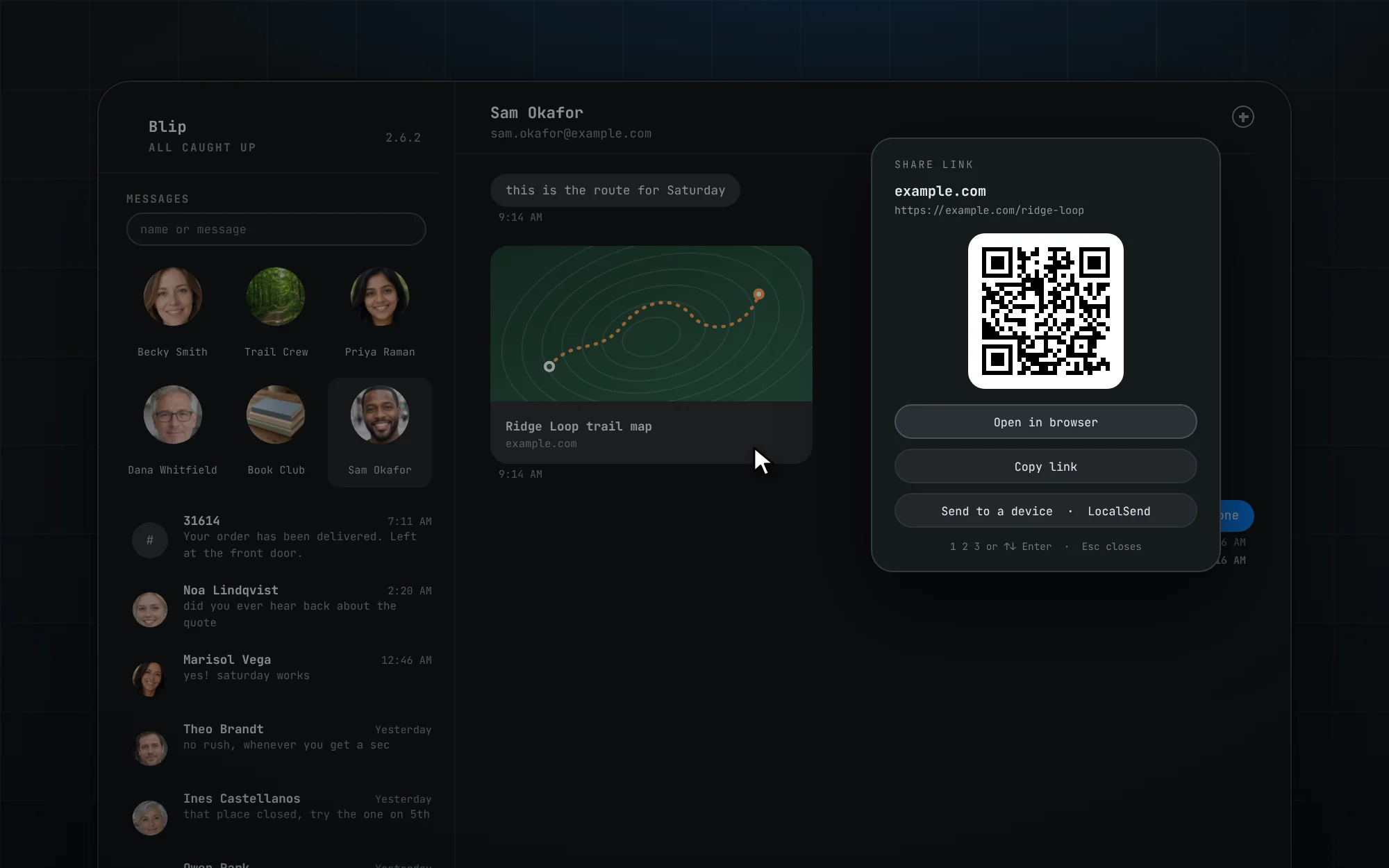
Links and the share sheet. A shared link shows as a card. Click it for a share sheet: open, copy, a QR code, or send it to another device.
Demo data. The four scenes are illustrations of the interface in the same style as the graphic above, drawn with invented people, example.com addresses and phone numbers in the 555-0100 range reserved for fiction. None of it is anyone's conversation.
Features
-
Bar
Unread count in the bar
The bar widget shows the unread count across every thread. It dims with a slashed glyph when the Mac is unreachable. Left-click opens the panel, double-click opens the app window, middle-click refreshes, right-click marks all read.
Unread count across every thread. It dims with a slashed glyph when the Mac is unreachable.
-
Threads
Blue dots, groups, pins
A blue dot stays until you open that conversation, the way iMessage does it. Groups are titled the way Messages titles them. Pinned conversations are mirrored from Messages on the Mac, in the same order, as avatar tiles above the list.
A blue dot stays until you open that conversation. Pins are mirrored from Messages, read-only.
-
Messages
Read and send
Real bubbles, yours blue on the right and theirs grey on the left. Send to people and to groups. Photos render inline, files send by Ctrl+V, drag and drop or /attach, and the "Read" receipt shows under your last read message. Tapbacks, inline replies and link cards show too.
Send to people and groups. Photos render inline, files send with a caption, and read receipts show.
-
App
A Messages-style window
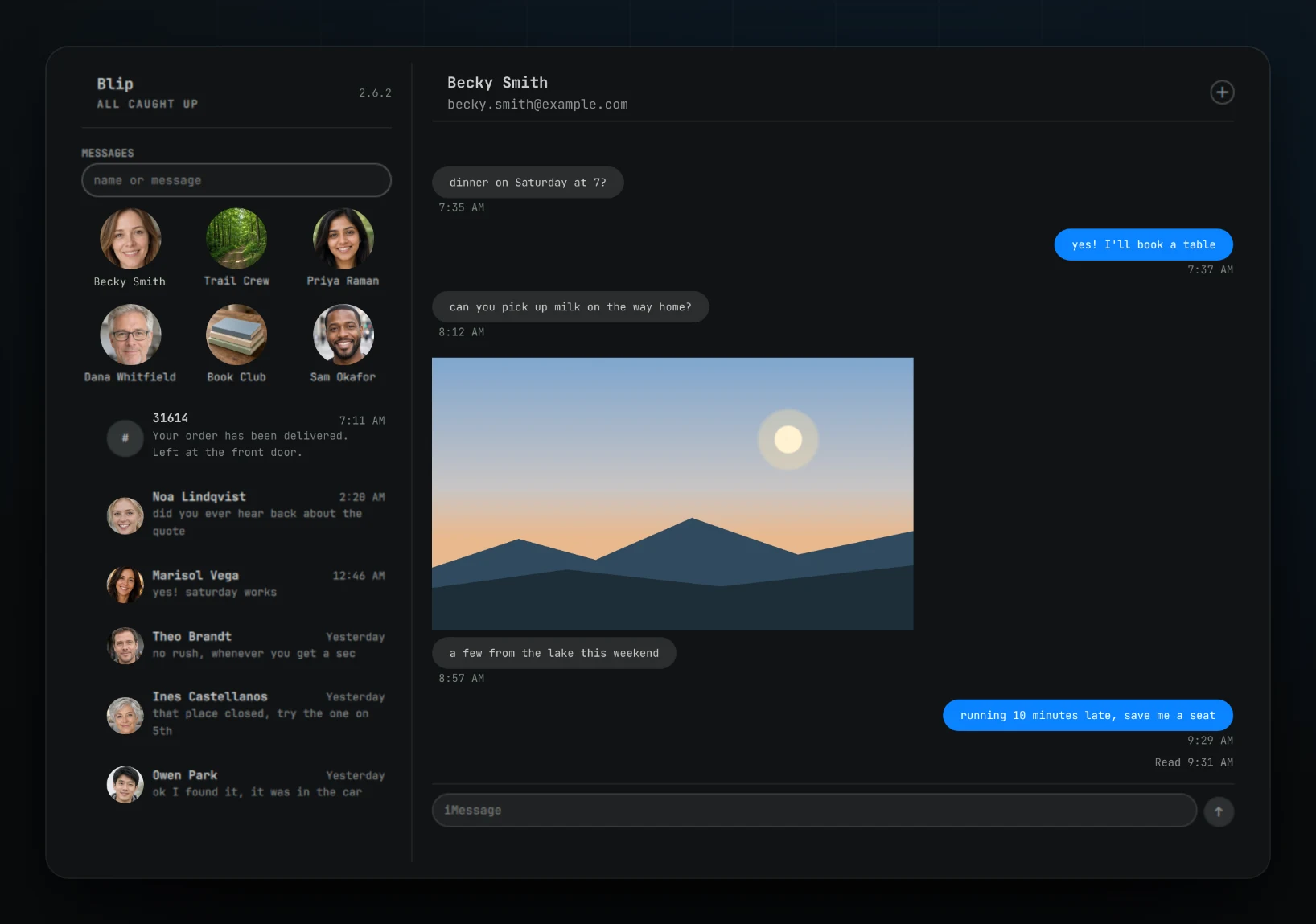
A window with a sidebar of every conversation, the open thread and a compose box, next to the bar popout. Open it with SUPER+M after adding the keybind from the README, or double-click the bar icon. It remembers its size across shell restarts.
A Messages-style window: sidebar, thread and compose. SUPER+M opens it once you add the keybind.
-
Toasts
Desktop toasts, on your terms
Desktop notifications fire only for senders on your allowlist. Everything else still counts and still shows, it just does not interrupt you. Click a toast and the panel opens on that conversation with the compose box focused.
Toasts only for senders on your allowlist. Everything else still counts. Click a toast to reply.
-
Private
Real time, nothing in the clear
A push watcher on the Mac pings when chat.db changes, so messages land in about 2 seconds. There is no server, no telemetry and no accounts. Everything between the two machines travels inside SSH on a dedicated key, and message text never lands on disk.
Messages land in about 2 seconds. No server, no telemetry, no accounts. Everything travels inside SSH.
What it cannot do: work without a Mac, or while the Mac sleeps. Blip displays edits and threaded replies but does not send them.
What people say
Public posts on X from people using Blip. The words are theirs, unedited. Where a post is longer, only the quoted part is shown and the link opens the whole post.
-
“Huge fan of Blip! Literally iMessage in @omarchy (does require a Mac on the network)”
1280 MHz · @1280MHz on X -
“This Omarchy plugin is bar far my most used and favorite”
Ding · @ding444 on X -
“This has been super helpful to me. I can get 2FA codes without opening my phone, quickly check a text, etc. Thank you!”
John · @John4ZX4 on X -
“…@NixFred for making Blip. Such a clutch tool on my Omarchy machine.”
Joel Gaff, Jr. · @joelga on X -
“Bought a 2018 MacBook Pro with a broken screen just so it could run Blip or BlueBubbles for my Omarchy installs”
Spencer · @spencer450 on X -
“…there's a great project by @NixFred called blip that does proxying of iMessage to a client in Omarchy. Pair that with tailscale, and you're golden!”
Jason Alexander · @jasona on X -
“…finding blip was one of those click moments for me over the past few months, where it really sunk in that we can just fix everything. No one is holding us back, we’re not even holding ourselves back anymore.”
Michael C Hurley · @MichaelH_rley on X -
“Blip is awesome! Thank you so much.”
Sour Ortanique · @SourOrtanique on X
Contributors
Blip is built in the open. Everyone below has a merged pull request or commits in the repository, and each line says what they did, with links to the pull requests. This list is rebuilt from GitHub whenever the site is built.
30 people: Fred Nix, who wrote Blip and maintains it, and 29 contributors.
-

Fred Nix
@nixfred · Author and maintainer
Wrote Blip and maintains it, reviewing and merging every contribution below. His own pull requests include #141, seven fixes from a whole project review, and #142, which lets Mark all read work while Blip says ALL CAUGHT UP.
-

Erik Fillipsveen
@Fileri
The largest contributor by merged PRs. Made Blip usable from the keyboard with a bubble cursor and paging (#37, #39, #56), a draft kept per conversation (#41), and tapbacks from the message menu (#116, #117), and fixed how unsent messages, app cards and stickers show up (#32, #34, #68).
-

Ian Swope
@ianswope
Tightened toasts and read state: no toast for the open conversation (#76), no duplicates on extra monitors (#85), none for a message already read elsewhere (#95), and clicking one opens its conversation (#136). Also made the panel open faster (#88, #98), kept security codes out of the environment (#73) and fixed tapbacks on a macOS 27 gateway (#138).
-

Jon Kinney
@jondkinney
Built the read only contact review, with a duplicate scan, full source card details and vCard export (#24, #59, #60, #61). Also kept failed sends visible with a reason (#50), added Ctrl+1 to 9 pinned shortcuts (#53) and Retina scale media (#23).
-

Danny Cecil
@jefehoser
Polished the app window and composer. Long text wraps and copied files attach (#28), group photos are found and retried (#29), the app comes back on its last workspace without stealing focus (#48, #87), and Super+M no longer closes unrelated windows (#93).
-

Zach Wilke
@zachwilke
Worked on speed and attachments: instant sends and resolved duplicate Contacts cards (#43), a startup toll removed (#83), animated GIFs that stay animated (#81) and messages that carry several files (#82). Also moved timestamps across the bridge as UTC (#80).
-

Damon Janis
@damonjanis
Made read state reliable by syncing it through a durable, verified queue (#120), with fixes for the unread badge (#101) and for acknowledging read pushes only after they finish (#102). Added Mark as Unread and Mark as Read (#121) and Pin and Hide Alerts (#122) to the conversation menu.
-

Adam Gamble
@adamgamble
Fixed early rendering and contact bugs: iPhone photos honour EXIF orientation (#9), bubble corners are square (#10), Family Sharing contact stores are ignored (#19) and pinned conversations survive shallow polls (#22). Also added the security code toast, with click to copy and a hotkey to type it (#35).
-

Johan Thorén
@johanthoren
Shaped the first app window: it fills its window like other Omarchy windows (#7), has live search and Super+M keys (#12) and jumps to a thread with 1 to 9 (#13).
-

joshhattan
@joshhattan
Fixed window placement so manual moves stick and the popout opens on the clicked screen (#109), and made security code autofill type the code when Gecko ignores set_text_contents (#110).
-

Brad Larson
@followbl
Kept Hyprland stable around displays that are off: no leader without a real screen (#113) and no floating window move when a workspace has no monitor (#128).
-

Guido Jouret
@gjouret
Fixed scrolling. Wheel and touchpad scroll now apply the delta 1 to 1 (#114), and mouse wheel notches glide through a smoothScroll setting (#115).
-

Brenden Bishop
@bbishdotdev
Added security code offers beside the focused field (#92).
-

Baden
@badenpiland
Added prefer_imessage=on in bridge.conf, which keeps mixed one to one chats on iMessage (#96).
-

Kb2uka
@Kb2uka
Added saving new contacts through the Mac bridge (#91).
-

Mark B
@Fail-Safe
Added allowlist notification controls to the conversation menus (#148), so toasts can be switched on or off per conversation without editing the file.
-

Joshua Warren
@joshuaswarren
Added hiding of Spam and unknown sender chats through bridge.conf (#49).
-

John Zetterman
@jzetterman
Made Blip survive the host's ssh agent and the bar's PATH (#140).
-

Brandon Smith
@bndnsmth
Kept the active conversation selected in the sidebar (#134).
-

Barry Jones
@brightball
Fixed a unified SMS chat row turning an iMessage DM green (#147).
-

Chad Stovern
@chadhs
Fixed blip-setup mangling bridge.conf values that contain 2, 7 or x (#124).
-

cw228
@cw228
Added bin_dir= in bridge.conf so the Linux shims can live outside ~/bin (#100).
-

David Reinecke
@dreinecke
Routed per conversation spawns through a source id seam (#105). Also filed the report that contact photos never showed.
-

Espen Zachrisen
@ezachrisen
Mirrored pinned conversations in Blip (#11).
-

Greyforge Labs
@GreyforgeLabs
Fixed search so sender aware self echoes are preserved (#126).
-

Jared Moody
@jaredmoody
Made blip-setup read SSH_CONNECTION in a fish safe way (#145).
-

Tobi Lehman
@tlehman
Added a mute list that hides spam conversations entirely (#27).
-

Unhook Dev
@tolewis
Fixed a bridge bug by keeping one chat row per group, so sends stop failing with error 1728 (#8).
-

Jethro Jones
@jethrojones
Made blip-check probe every Contacts source, not just the first (#2).
-

David Benedic
@daveyb
Landed two commits from a closed Windows tray PR (#131): imsg-send now waits 150 seconds for the Messages Automation prompt (b440a49), and a test requires that wait (1b55b40).
Also thanks to the people whose issues changed the code: jacobaross (a report on the Messages Automation prompt timing out, with the evidence attached), Zain Nayer (a DM labelled with a raw phone number), Benny (a compose box that clipped after five lines), edmooredop (security code toasts for alphanumeric senders (#143)).
Pull requests and commits are from GitHub, October 28, 2026. Bots are left out. An X link appears only where the project's CONTRIBUTORS-X.md lists one.
On GitHub
- 176 stars
- 44 forks
- 30 contributors
- MIT license
Star and fork counts are from GitHub, October 28, 2026. Contributors are the people listed above.
Part of nixfred.com
Blip is one of Fred Nix's projects. See the rest at nixfred.com